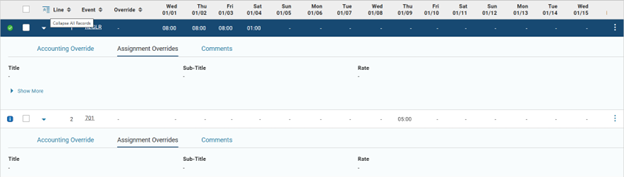
Expand/Collapse All Rows
If the grid layout displays some of the columns by default and requires row expansion to see additional fields after the row is expanded, you can expand or collapse each row individually. If your site has enabled the ENABLE_EXPAND_COLLAPSE_ALL parameter on the ERP Application Parameters (ERPCTRL) page (that is, set to true) and the grid supports Expand/Collapse All Rows, the grid shows an icon that can be used to expand or collapse all rows.
The Expand All or Collapse All icon is located in the grid header above the individual row’s caret icon. The icon and associated tooltip indicate whether the action expands or collapses the rows in the grid.
-
If the records are collapsed initially, the Expand All icon is available. After using it to expand all rows in the grid, the icon changes to the Collapse All icon.

-
If the records are expanded initially, the Collapse All icon is available. After using it to collapse all rows in the grid, the icon changes to the Expand All icon.