PayPal Gateway Integration
A payment gateway is a technology that enables secure and efficient online transactions between customers and merchants. It serves as a link between the merchant's website or point-of-sale system and financial institutions, ensuring the safe transmission and processing of payment data for seamless fund transfers.
This guide details the integration of PayPal as a payment gateway within the system. Users can make transactions through a simple payment page that supports multiple options, including PayPal and Stripe. After selecting a payment method, they are redirected to the respective platform to complete their transaction.
The PayPal feature can be enabled by setting the enabled property to true for the PayPal parameter in the paypal.conf file. This feature is delivered with the enabled property set to false.
Features
-
Multiple Payment Options: Accept payments through PayPal and Stripe, offering users flexibility and convenience.
-
Advanced Security Measures: Protect transactions with Fraud Protection, Buyer Protection, and secure payment processing.
-
Seamless Transactions: Automatically create and capture PayPal orders, ensuring smooth and efficient payments.
-
Real-Time Payment Updates: Instantly display transaction statuses and provide clear notifications for users.
-
Comprehensive Account Management: Access detailed transaction records, transfer funds quickly, and manage payments easily.
-
Error Handling and Notifications: Provides clear messages in case of any issues.
How It Works
-
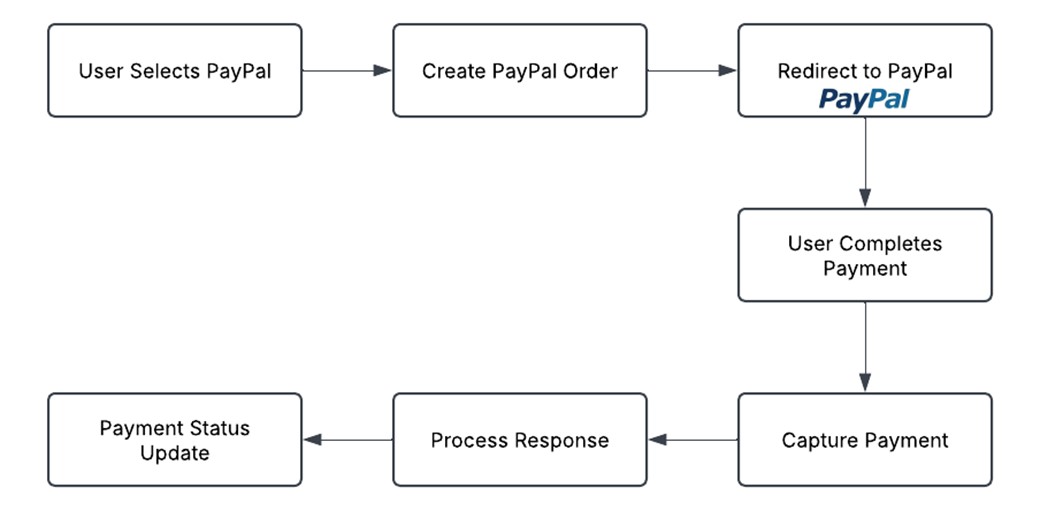
Selecting a Payment Method: The user chooses "PayPal" from the payment page.
-
Order Creation: The system creates a PayPal order for the transaction amount.
-
Redirection to PayPal: The user is redirected to PayPal’s secure payment page.
-
Completing the Payment: The user authorizes and completes the payment on PayPal.
-
Payment Confirmation: The system captures the payment and updates the order status.
-
Transaction Status Update: The user receives a confirmation message about the payment status.
Understanding Payment Status Messages
The system provides real-time updates about your payment. Below are possible statuses you may see:
-
Payment Succeeded: Your payment was successful. You will receive a confirmation receipt.
-
Payment Pending: Your payment is being processed. Please check back later for confirmation.
-
Payment Failed: The payment was not completed. Please try again or contact support.
-
Transaction Canceled: You canceled the transaction before completing it.
Important Considerations for Secure Transactions
-
Ensure a Secure Environment: All transactions should be processed over a secure connection using HTTPS.
-
Payment Options: Users can complete transactions using a PayPal account or by paying directly with a credit or debit card.
-
Avoid Multiple Payments: Do not refresh or close the browser during payment processing to prevent duplicate charges.
Error Handling and Customer Support
-
If there are any issues during payment, the system will provide clear instructions.
-
In case of failed transactions, users are advised to check their payment details and retry.
-
Customer support is available for any payment-related inquiries.
-
Refunds or disputes should be initiated through PayPal’s resolution center if necessary.
Payment Process Flowchart
The following diagram shows the payment steps: