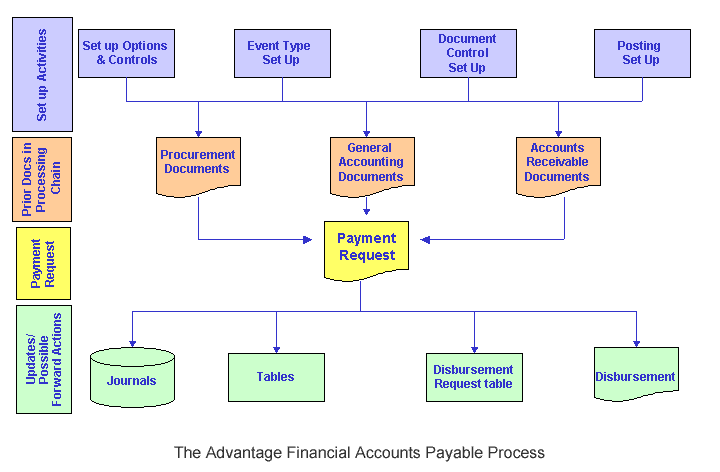
The Accounts Payable life cycle includes the following business processes:
|
Certain system setup and system configuration activities must be completed before the full functionality of Accounts Payable is available. Some setup is required establishing system-wide parameters, while other setup activities take place within the A/P subsystem itself. The result of the setup activities is to establish controls and inferences, as well as to define how certain processes within A/P, such as retainage and payment processes, will function. |
|
A payment request authorizes the spending of money and initiates disbursement procedures. It establishes an accrued expenditure and disbursements payable. In Advantage Financial, the primary instruments to request payment are:
|
Managing DisbursementsPayments in Advantage Financial are scheduled for disbursement if they pass budgetary edits and common document edits (namely, vendor, accounting, etc.). Disbursement Management assures that high priority payments are disbursed before other lower priority payments. It is a particularly important function when dealing with cash constraints (for example, scheduled disbursement exceeding amount of available cash), or critical payments (for example, child welfare). Disbursement Management in Advantage Financial provides the means to manage disbursements at almost any level of detail, by providing the capability to reschedule, hold, or prioritize scheduled payments prior to the disbursement process. Generating DisbursementsAutomated Disbursements is the process that disburses payments that have been authorized in Accounts Payable. The Automated Disbursements process selects authorized payments, edits payments for validity, processes payment adjustments, groups payment data, formats payments, and posts payment transactions. In short, it is the process that takes payment data (posted in the form of a Commodity Payment Request, Matching Payment Request, or General Accounting Expenditure document), and transforms this into a disbursement instrument (in the form of a check/warrant or EFT record). Cancelling/Reclassifying DisbursementsDisbursement cancellation/reclassification cancels or reclassifies checks, warrants (including warrants with clearing funds) or electronic funds transfers (EFT), and provides the flexibility to perform one of three cancellation actions (reschedule, hold, close) or one of three reclassification actions (stale or escheat individual disbursements, or cancel). For more information, refer to the Disbursement section. |
|
In Advantage Financial, the Check Reconciliation process is used to maintain consistency between the bank records and the disbursement records within the Advantage system. The Check Reconciliation process maintains consistency by reconciling disbursement records within Advantage Financial with information sent by the bank. Check reconciliation provides an automated means of handling exceptions where, for example, the bank's check balance is different than the book balance recorded in the Advantage Financial system. For more information, refer to the Check Reconciliation section. |
|
Advantage Financial allows for the withholding of a portion of progress payments, called Retainage, as security against the contractor's performance over the life of the Award. Retainage can be released over the life of the Award, or at the completion of the Award; whenever the terms of the Award have been satisfied. This section includes:
For more information, refer to the Retainage section. |
|
1099 reporting is the process that reports vendor income to the Internal Revenue Service (IRS) for the calendar year. The 1099 process captures spending activity throughout the year in a central repository, the 1099 Journal. At calendar year end, the process takes the information, and, based on the reportability of the vendor and chart of accounts defined on the transaction, cumulates in data files that may be used in a third party tool to generate 1099 forms. This section includes:
For more information, refer to the 1099 Processing section. Advantage also supports the reporting of 1042-S form. Even though they are produced within the Offline 1099 Process, it has it own set up and criteria. For more information, refer to the 1042-S Processing section. |
|
Procurement Folder Management Logic: Several Procurement Folder fields have been added to PR, AD, MD and DC Doc type document code pages: Procurement Folder, Procurement Type ID and Procurement Type and View Procurement Folder action.
The following logic applies for the Procurement Folder logic: If a PR DC Doc Type document references another document that already contains a Procurement Folder, then on validate when document is in Draft phase, the system will infer a display only value from the same referenced document fields to the Procurement Folder and Procurement Type fields at the Commodity Line Level of the Payment Request documents.
Once the Procurement Folder and Procurement Type fields are populated with the inferred values and the link to the referenced Procurement Folder has been established, the system will also update the Post-Award State view of the linked Procurement Folder with document information related to the Payment Request. If one or more commodity lines of a Payment Request are linked to a Procurement Folder, that document will be listed in the Post-Award State view of the linked Procurement Folder. Since each Commodity Line on a Payment Request document is capable of referencing a document in a different Procurement Folder, there is the possibility that a single payment request document could be linked to more than one folder. If through document referencing an Accounts Payable document is linked to more than one Procurement Folder, then that document will appear in the Post-Award State View of each Procurement Folder it is linked to. If user should modify the commodity line to $0.00 for the selected folder, the Payment Request appears as a modification in the Document section of the PRCUID page and will remain linked to the folder. If the Payment Request references a procurement and the Procurement Folder fields are populated, the View Procurement Folder action is activated and displayed on the Commodity Line of the Payment Request Draft. Clicking on the View Procurement Folder action transitions the users directly from the document to the linked Procurement Folder record found on the Procurement Management (PRCUID) table allowing users working within a given document to transition to the assigned Procurement Folder without having to navigate through page search. When ‘View Procurement Folder’ hyperlink is clicked, the ‘View Procurement Folder’ page transition will trigger the system to open the Procurement Management (PRCUID) page in the ‘All States’ view filtered by the Procurement Folder value from the transitioning document. Users can then select the ‘Post-Award’ state from the Available States section to review all relevant Post-Award documents that have been processed for the selected folder. A ‘Back’ link on PRCUID page takes the user back to the document that they transitioned from. If PRCUID is opened from page search and not through the use of the ‘View Procurement Folder’ link then the ‘Back’ link on PRCUID will not be displayed. If the AD, MD or DC documents are referencing a document that has Procurement Folder fields populated, these values are inferred to the same fields on the accounting component of the disbursement documents. Once populated, activates the View Procurement Folder action link allowing users to transition to the PRCUID page to view contents of the procurement folder. As described above, the Back link will allow users to transition back to the disbursement document header. |