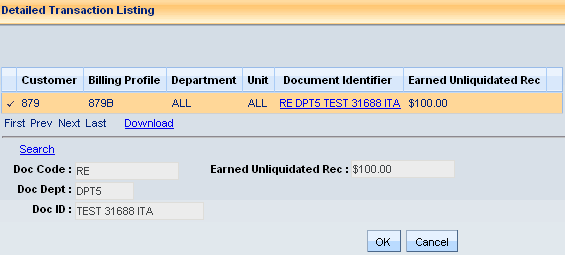
You can view customer account balance and credit history information for non-miscellaneous customers using the Customer Account Information (CUSTA) table. To find the desired customer account information, you can search by several attributes, including:
Department
Unit
Customer number
Customer name
Billing profile
Additionally, you can obtain detailed activity information by document for a particular customer account amount via drilldown queries.
A drill down feature available for stand alone amount fields is the ability to view the finalized documents that have a non-zero impact against the amount field. Cancelled documents, zero-dollar documents, and documents modified to zero will not be displayed as they do not have an impact on the total amount.
Each amount that has this document review ability is followed by an image of a magnifying glass. When a mouse click is done on this image a page is opened that lists in a grid, those documents that have updated the amount field. The most recent documents that updated the amount are listed first. The grid contains a document link that will open a document for review. Beneath the grid is a display of the amount, which is comprised of amounts from all versions of the document selected in the grid. As such a list can be very lengthy; navigation actions are present beneath the grid along with the search feature. An amount column is provided in the grid to help with locating specific record amounts.
The download action found just below the grid of documents will create an Excel file of all documents for the amount being investigated. That file can then be saved locally with a name provided by the system user. The Download action is not one that is directly secured by an action flag on the Access Control page used in security setup, but rather security to the feature is limited by access to the Transaction Listing or the Customer Account Information (CUSTA) from which the Transaction Listing is opened.
There is a limit to the number of lines that any Excel workbook can hold. Because of this limit, the download feature has been built with a 2000 line limit. Downloads of heavily used customer accounts may likely encounter this limit, in which case another reporting means should be sought. Just as documents are not listed online that have had a net impact of zero on a customer account amount, the download will not display those either. This is a result of the download being only the set of records returned in the online query. For example, the entry of an earned receivable on a receivable document that is then cancelled will not be listed as an update to an earned unliquidated receivable from the first version that was reversed on the cancellation.
The download file contains nine columns as delivered: document code, document department code, document id, amount (labeled for customer account amount), customer, billing profile, AR department, AR unit, and a date and time stamp of the last update. The time and date stamp is from the most recent update to the customer account by the document. Shown below is a sample of a download:

The delivered template (CUSTA_TMPL.xlsx) for the download can be changed to remove or add columns. The file can be found in the following sub directory - advantage.war\advantage\Accounts_Receivable. When adding columns, the Customer Account Detail table is the data source for the download.