-
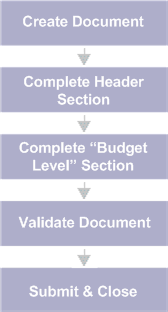
Create the desired budget document code. Refer to the "Delivered Budget Structures" section for information matching a Document Code to a particular budget structure.
-
Complete the Header section. Enter any document-wide information on the Header section you would like to default to all budget lines.
-
Complete the appropriate budget level section.
-
Click the Validate button to validate for errors.
-
If errors exist, fix the errors and repeat Step 4. If no errors exist, then continue with Step 6.
-
Click the Submit button to submit the document.