Advantage Fixed Assets provides the option to store information related to the estimated cost to replace each asset. Called the "valuation amount," this cost is independent of acquisition cost and net book value. The Valuation Amount field is located in the Cost, Valuation, and Depreciation subsection of the Fixed Asset (FA) document, and can be defined at the time an asset acquisition is recorded in the system, or at a later date as part of a modification transaction.
The system also provides a way to automatically modify groups of related assets using an offline process. The Fixed Asset Mass Revaluation (FAMR) process allows you to specify an increase or decrease in Valuation Amount (using a percentage or dollar change) and automatically generates Fixed Asset Modification (FM) documents to record the change. If you run this process in Report mode, no documents are created. See the Advantage Financial System Administration Guide for more details on how to run this offline process.
Your organization’s policy decisions determine if this information is included for your assets; and, if it is included, how and when this amount should be increased or decreased.
The Fixed Asset Mass Revaluation Process (FAMR) revalues assets by a specified dollar amount (increased or decreased), by a specified percentage of the current valuation amount, or by a user-defined Replacement Amount. The process creates Fixed Asset (FA) documents with the FM (Modification) document code that assign this new valuation and valuation date.
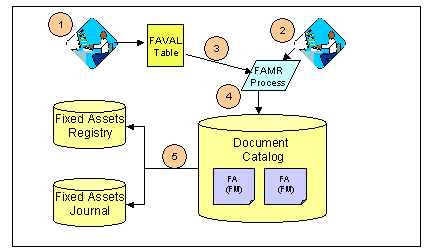
The following diagram illustrates the components involved in performing a mass revaluation and the order in which these components come into play in the process. The numbers in the diagram correspond to the following table, which describes each of the steps.
NOTE: The same asset cannot be revalued twice on the same process date.
Process for Performing a Mass Revaluation
General Steps for Performing a Mass Revaluation
Open the user-maintained FA Reval Parameter (FAVAL) table.
Fill in the fields to define:
The new valuation amount. This can be either a specified dollar amount (increased or decreased), by a specified percentage of the current valuation amount, or a user-defined replacement value.
Asset or group of assets to be processed by filling in the FA Group, FA Group Class, FA Group Category, Commodity Code fields, and the Composite Indicator check box.
The order in which records are selected and processed (Process Sequence Number field).
Save the table.
See the Advantage Financial Page and Table Guide for details on working with user-maintained tables.
Using the Batch Administration pages under the Application Administration workspace, set up and run the Fixed Asset Mass Revaluation (FAMR) process in Update mode. NOTE: Only users with the appropriate security access can use these pages.
See the Advantage System Administration Guide for details on how to use the Application Administration workspace and see the CGI Advantage Financial - Fixed Assets Run Sheets guide for further details on running the FAMR process.
The FAMR process checks the FAVAL table to get the parameters you entered, and then calculates the new valuation amounts. If a valuation amount does not currently exist for the asset, the process uses the total asset value as its base value for calculations.
The FAMR process creates and submits Fixed Asset (FA) documents with the FM (Modification) document code for assets based on the parameters you entered in the FA Reval Parameter (FAVAL) table.
The accounting event type associated with the document code causes certain updates to take place when the document is finalized. The Event Type FA05 - Modify Fixed Asset is available for Fixed Asset (FA) document with the FM (Modification) document code. The system updates the Fixed Asset Registry (FAR) and the Fixed Asset Component Journal (JFACJ).