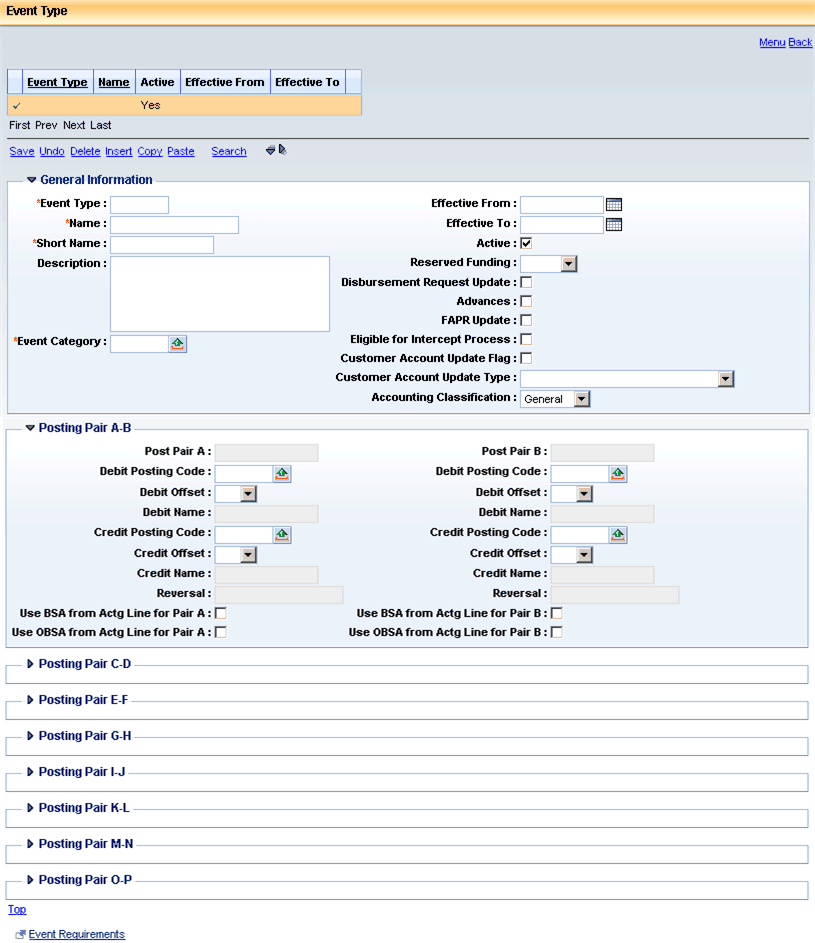
The Event Type table exists to define valid accounting and budgeting events within CGI Advantage Financial. The table is pre-populated with many event types when delivered. Adjustments to these can be made. Keeping a record of these changes is a very good idea in case the baseline event types have to be restored. Additions can also be made. It is suggested that they begin with the letters 'XX' or contain no letters at all so that later releases will not introduce a baseline event type with an ID that has been used as a custom event type. Deletions are not recommended. What is recommended is that when an event type should not be used, that it is removed from the document code or codes defined as capable of using the event type on the Allowed Event Types for Document Code (AETDC) table.
Event types are most often inferred to the accounting line. Setup for the most common or the correct event type based on existing document data allow for these defaults. When a default does not exist, an event type must be chosen (certain Journal Vouchers being the exception). If the most common event type does default, a user can change that event type or even manually enter one to prevent the default. Sometimes event types are defaulted based on existing data already on the accounting line. In such cases, the defaulting table also functions as an editing table to prevent a user from selecting another event type.
To setup the most common event type to default, the Default Event Type flag is checked for a single event type defined to a document code on the AETDC table. The system then pushes that event type ID to the Document Control (DCTRL) table into the Def Event Type field.
Other tables that control the defaulting of event types are the Payroll Event Type Defaults (PYRLETD), AP Event Type Crosswalk (APETXW), DC Event Type Crosswalk (DCXWLK), MD Default Event Type (MDDFEV), Warehouse (WHSE), and the Event Type Defaults (ETDFLT). These tables are covered in the Document Accounting Controls section under Document Configuration later in this user guide.
When an event type is first used in an application, the posting codes for that event type are put into a temporary memory source that will be used until the application is bounced. For this reason, changes to an event type that have already been used since the last bounce will not take immediate effect.
Some event types that use the Generic event type processor do not even have posting codes defined for posting pair A. These event types are referred to as non-accounting event types because there are no postings to any journal, budget, or other tables updated by posting lines. A common use for these types of event types is on documents early in the procurement life cycle where the COA to be charged is not know yet, but a document is needed to start the procurement process. Another use is the recording of future budget fiscal years on a contract document. As the total of accounting lines must sum to the commodity line total, future years on a contract require accounting lines for those years to enter a complete contract.
Some event types do not have but a single posting code defined to posting pair A. These are one of three types. The first of this type are budgeting event types that update budget amounts. Only a single posting code is needed in such a case. The second situation for such an event type are cost accounting event types that record costs that are not written to the Accounting Journal, thus do not have to balance. The third situation is an event type used on a Journal Voucher where users of that JV and event type should enter only one posting code on the accounting lines.
Once a document goes to the Final document status, an event type cannot be changed on the accounting line. If the event type were the incorrect one, a modification should be created. The incorrect accounting line should be copied and the correct event type entered on the new line. The line amount of the old line should then be set to $0.00 or to equal the Closed Amount of that line.
Fields on the Event Type (ETYP) table:
|
Field Name |
Field Description |
|
Event Type |
A required unique identifier for each event type. Delivered event types contain two letters followed by two numbers. |
|
Name |
A required text field used to describe an event type often for reporting and for informational reasons on an event type pick page. |
|
Short Name |
A required short text field used to describe an event type often used for reporting when the full name will not fit. |
|
Description |
An optional long text field available to explain what an event type does, when it is used, or any other information. |
|
Event Category |
The associated event category that is required for each event type. Only valid categories on the Event Category table can be chosen. This field should rarely be changed as it determines the processing logic used for the event type. |
|
Effective From |
An optional date from which an event type can be used. The Document Record Date is compared to this date. The event type will not be allowed for use if the Document Record Date is earlier. |
|
Effective To |
An optional date to which an event type can be used. The Document Record Date is compared to this date. The event type will not be allowed for use if the Document Record Date is after. |
|
Active |
An indication that an event type is active for use. When not active, the event type cannot be used even if it is defined as allowable. |
|
Reserved Funding |
The value defaulted to an accounting line that uses the event type. Valid values are No, Yes, and Locked. The defaulted value may be changed by a user manually. Values of Yes and Locked have the same functionality of not being included on a referencing document if set with either of those values on a referenced document. Such values are used for future year contract lines and reserved funding lines that should not be used until unreserved funding lines are exhausted. |
|
Disbursement Request Update |
Indicates that the accounting line should update the Disbursement Request table when used with the event type. |
|
FAPR Update |
Indicates whether or not an accounting line using the event type should update the Fixed Asset Payment Request (FAPR) table to track the fixed asset shell generation when the commodity line parent to the accounting line had a Shell Indicator of Single Shell or Multiple Shell. |
|
Eligible for Intercept Process |
Indicates whether or not a Receivable accounting line with the event type can be added to the Intercept Request table to intercept a disbursement. Further edits also occur for the same flag but on the Object and Revenue Source tables for the respective code used on the Receivable accounting line. |
|
Customer Account Update Flag |
Indicates that an accounting line with the event type should update the Customer Account table in the manner specified in the Customer Account Update Type field. |
|
Customer Account Update Type |
Indicates the type of update that should be made to the Customer Account table when an accounting line uses the event type. This field is required when the corresponding flag is selected. If a value is chosen in this field but the corresponding flag is not selected, no update will be performed. Changing values in this field and in the flag will cause Systems Assurance 9 to be out of sync if the event type has previously been used with a customer account. Updates to the Customer Account tables use the posting lines generated on a document. For this reason, descriptions below refer to Standard and Liquidation posting lines. Standard lines are new postings that occur because of an event type. Liquidation postings occur because of a reference to a previously processed accounting line. They are called liquidation postings because they liquidate or back out previously posted amounts.
|
|
Accounting Classification |
Event types have to be grouped into one of four major types for reporting. Also, these classifications are available for business rules when event category is not the proper or most efficient level for a rule.
|
The following fields are repeated 16 times. Once for each posting pair A thru P. Changes to fields in this section after an event type has been used, will require an application bounce for the changes to take effect.
|
Field Name |
Field Description |
|
Posting Pair |
The inferred name of a posting pair from the Event Category table for the associated event category of the event type. |
|
Debit Posting Code |
The posting code that will be debited given an accounting line increase on a new draft document or a positive increase on a modification draft. On an accounting line reduction, the code would be credited. |
|
Debit Offset |
The inferred value for the Offset flag on the Posting Code table for the Debit Posting Code. The value may be changed as long as it is not set to Yes and the Credit Offset value on the same posting pair is not also Yes. |
|
Debit Name |
The inferred name for the Debit Posting Code that is inferred from the Posting Code table. |
|
Credit Posting Code |
The posting code that will be credited given an accounting line increase on a new draft document or a positive increase on a modification draft. On an accounting line reduction, the code would be debited. |
|
Credit Offset |
The inferred value for the Offset flag on the Posting Code table for the Credit Posting Code. The value may be changed as long as it is not set to Yes and the Debit Offset value on the same posting pair is not also Yes. |
|
Credit Name |
The inferred name for the Credit Posting Code that is inferred from the Posting Code table. |
|
Reversal |
The inferred Reversal flag setting from the Event Category table for the associated event category of the event type. |
|
Use BSA from Actg Line for Pair A |
An indication that will take any values entered on the accounting line in the BSA and Sub BSA fields and use them on the generated posting line(s) for the posting pair where the indication is made. |
|
Use OBSA from Actg Line for Pair A |
An indication that will take any values entered on the accounting line in the OBSA and Sub OBSA fields and use them on the generated posting line(s) for the posting pair where the indication is made. |