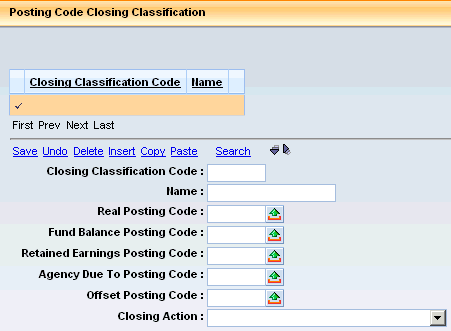
This table is similar to the rollup tables for the chart of account elements. That is, one or more posting codes are associated with one classification and only one. The Annual Close process and the Trial Balance report program use these classifications to determine what actions should be taken with journal records. Custom reports and batch programs will likely also use these classifications to enable the selection of multiple posting codes with the specification of one or more classifications. In fact, this is a recommended approach when feasible because the introduction of new posting codes would not require a change to the report or batch logic.
The values on this table are pre-loaded with CGI Advantage Financial. Others can be added if needed. There would be no change to the Annual Close process unless a new Closing Action is needed. When adding new classifications, the code used should be one that begins with 80 or higher so that later releases of Financial do not provide a new baseline closing classification code with the same ID. Deleting codes is not recommended. If one is not to be used, then all of the posting codes should be disassociated. Changing settings on existing codes is also permitted. Keeping a record of any changes is a very good idea in case the baseline posting closing classification codes have to be restored.
For more information on the Annual Close process and Trial Balance report, please refer to the Annual Close section later in this user's guide and the CGI Advantage Financial General Accounting Run Sheet guide for those two batch jobs.
Fields on the Posting Code Closing Classification (PSCDCL) table:
|
Field Name |
Field Description |
|
Closing Classification Code |
A required unique identifier for each closing classification code. Delivered codes contain one or two numbers. |
|
Name |
A required text field used to describe a posting code closing classification code often for reporting and for informational reasons on a posting code closing classification pick page. |
|
Real Posting Code |
When the closing of a real account (a posting code with an account type restriction and an associated balance sheet account) occurs, the balance in that account is closed to the posting code in this field. The field contains a clearing posting code value that is only used in closing and not used for recording normal business activity. The Real Posting Code should have the same Account Type, Cash Account, and Memo Account settings as all posting codes that belong to the closing classification that uses the Real Posting Code. |
|
Fund Balance Posting Code |
When the Close Fund Into Account field for a fund code is set to Fund Balance on the FUND table, Annual Closing will close all activity for posting codes with a closing classification that has a Closing Action of Close Out Nominal to the Fund Balance Posting Code of that closing classification. |
|
Retained Earnings Posting Code |
When the Close Fund Into Account field for a fund code is set to Retained Earnings on the FUND table, Annual Closing will close all activity for posting codes with a closing classification that has a Closing Action of Close Out Nominal to the Fund Balance Posting Code of that closing classification. |
|
Agency Due To Posting Code |
When the Close Fund Into Account field for a fund code is set to Agency Due To on the FUND table, Annual Closing will close all activity for posting codes with a closing classification that has a Closing Action of Close Out Nominal to the Fund Balance Posting Code of that closing classification. |
|
Offset Posting Code |
When activity is closed out into a nominal account or the Net Asset account, there has to be an offsetting entry to balance out the closing in the old fiscal year. When closing out into a new account, there has to be a posting code for use in the new year. The Offset Posting Code value serves both these purposes. |
|
Closing Action |
There are four different closing actions that serve four very distinct annual close results.
When such activity is found in the input ledger for Annual Close, the program will ignore those records. Such accounts often are just for reporting purposes in the year recorded and have no accounting impact in any financial statements. When this value is selected, none of the posting code fields should be completed as those values will not be used anyway.
When such activity is found in the input ledger for Annual Close, the program will close the balance out to the Real Posting Code in accounting period 99 of the old year and record the original balance to the original account in accounting period 0 of the new year. All of the Chart-of-Account information is the same between both lines.
When such activity is found in the input ledger for Annual Close, the program will close the balance out to the Real Posting Code in accounting period 99 of the old year and record the original balance to Offset Posting Code in accounting period 0 of the new year. Chart-of-Account information on both lines is at the level of detail available in the ledger used for Annual Close, which will be greatly reduced from what level was recorded on the original liability.
When such activity is found in the input ledger for Annual Close, the program will close out the balance to the Real Posting Code and offset it with an entry to the Offset Posting Code. The Real Posting code will infer a new balance sheet account (according to the default account setup for that posting code) to be used with the other COA of the selected record in the old year. The Offset Posting code will not infer any new COA and just use that of the selected account in the old year. All of this activity occurs in accounting period 99 of the old year. The Real Posting Code will fall into a classification that has a roll action of Roll Forward. Thus an account with the Close To Net Assets action will result in 4 annual closing entries.
Expenditures and Collected Earned Revenues. When such activity is found in the input ledger for Annual Close, the program will close out the balance to the proper posting code (Fund Balance or Retained Earnings or Agency Due To) and offset it with an entry to the Offset Posting Code. Both entries will use the original COA of the input records and be recorded in accounting period 99 of the old year. The Fund Balance, Retained Earnings, or Agency Due To Posting Code will fall into a classification that has a roll action of Roll Forward. Thus an account with the Close Out Nominal action will result in 4 annual closing entries. |
To assist those with reporting needs that were based on the Account Types of previous CGI Advantage Financial, the following table has been provided as a basis for cross-walking the old Account Types to Closing Classifications. Certainly, some level of analysis on data in the prior and new application would have to be considered. When an account type does not match to a closing classification, but rather a posting code, the delivered posting code(s) is listed. This crosswalk is broken into those account types that are for accounting documents and those that are for budgeting documents.
|
Account Type |
Closing Classification(s) or Posting Code(s) |
Comments |
|
01 Asset |
1 Asset Roll Forward |
|
|
01 Asset |
5 Cash Roll Forward |
The different classifications because of the Cash Account edit for the Real Account Posting Code for this classification. |
|
02 Liability |
2 - Liability Roll Forward |
|
|
03 Equity |
3 - Equity Roll Forward |
|
|
11 Asset Offset to Expenses |
4 Contra Asset Roll Forward |
|
|
18 Memo Pre Encumbrance |
P010 - Memo Pre Encumbrance |
This posting code is delivered in classification 6 Accounts Left In Old Year. |
|
19 Memo Encumbrance |
P012 - Memo Encumbrance |
This posting code is delivered in classification 6 Accounts Left In Old Year. |
|
20 Pre Encumbrance |
13 Pre Encumbrances |
|
|
21 Encumbrance |
12 Encumbrances |
|
|
22 Expenditure / Expense |
11 Accrued Expenditures |
If internal accrued expenditures are not to be selected there are several posting codes defined that would have to be excluded: A025, D021, and D024 (plus any custom ones) from those that belong to this classification. |
|
22 Expenditure / Expense |
10 Cash Expenditures |
If internal cash expenditures are not to be selected there are several posting codes defined that would have to be excluded: A017, D015, D022, and D025 (plus any custom ones) from those that belong to this classification. |
|
23 Expenditures |
|
Functionality of this account type was that an expense budget update should occur, it should close out as a nominal, and an asset account was created at annual close. The delivered event type of AP02 provides the ability to record the budget expenditure and the asset update at the same time now. Therefore, posting codes in 4 classifications are recorded at once: 11, 2, 1, and 3. |
|
24 Expenses |
F020 Depreciation Expense |
While these posting codes are in classification 10, they may equate to account type 24 when they are implemented without any budget updates. Therefore posting codes that close like a nominal, but have no budget update will match this account type. If implemented with budget updates, they would fall under account type 22. |
|
24 Expenses |
S005 Inventory Adjustment Expense |
See above |
|
24 Expenses |
F021 Gain/Loss Expense from Sale of Fixed Asset |
See above |
|
N/A |
7 Equity Offsets Closed to Net Assets |
Equity accounts to offset expenditures for future services are in this classification to facilitate different needs between modified accrual and full accrual reports. Since modified accrual reporting would require that an equity account such as fund balance not be reduced by such expenditures, the offset equity account would be added into fund balance. |
|
31 Revenue |
15 Billed Revenue |
If internal revenues are not to be selected there are several posting codes defined that would have to be excluded: A026, R020, R021, and R023 (plus any custom ones) from those that belong to this classification. |
|
32 Revenue Collected |
14 Collected Revenue |
If internal revenues are not to be selected there are several posting codes defined that would have to be excluded: A018, F032, R022, and R024 (plus any custom ones) from those that belong to this classification. |
|
85 Project Charge |
C001 Charge C002 Back End Split C003 Revenue Credit |
As these types of posting codes are not written to the accounting journal, there is not a need to handle them in annual closing. As the Closing Classification is required, it has been delivered as Leave Balance in Old Accounting Fiscal Year. |
As the budgeting area is very different from prior releases, there are several significant changes when it comes to reporting. The first is that budgeting documents do not post to the same journals that accounting documents do. They post to a separate budget journal and the entries posted are not balancing entries. The second is that there is not any delivered difference between the posting codes that update budget structures that track just revenues or spending and those that update structures that track both. The third is that a unique posting code exists for each budget amount updated.
As budget posting codes are not written to the accounting journal, there is not a need to handle them in annual closing. As the Closing Classification is required, it has been delivered as Leave Balance in Old Accounting Fiscal Year.
|
Account Type |
Closing Classification(s) or Posting Code(s) |
Comments |
|
39 Revenue Transfer |
B016 Transfer Revenue Budget |
|
|
41 Budgeted Obligations |
B001 Adoption B002 Amendment B003 Carry Forward B004 Transfer In B005 Transfer Out B007 Allocation |
There are now many posting codes that update various amounts and are the same ones that update expenditure budget amount fields on an 'expense only' and a budget that tracks 'expenses and revenues.' B018 and B019 were left off of here because those amounts were not available on the Expense Budget of prior applications but only the Appropriation Budget. |
|
42 Appropriations |
B001 Adoption B002 Amendment B003 Carry Forward B004 Transfer In B005 Transfer Out B007 Allocation B018 Expected Revenue B019 Amended Expected Revenue |
There are now many posting codes that update various amounts and are the same ones that update expenditure budget amount fields on an 'expense only' and a budget that tracks 'expenses and revenues.' |
|
43 Allotments |
N/A |
Allotments are updated with the same posting code as the budget line. The budget journal is just populated with allotment ID fields to differentiate. |
|
45 Reverted Amounts |
B008 - Expenditure Budget - Reversion |
Normally used to record the amount of budget authority taken out of a budget line of an old year. That amount may or may not have been rolled into a new year budget line as a carry forward amount. |
|
45 Reverted Amounts |
B014 - Revenue Budget Reversion |
Normally used to record the amount of budget authority taken out of a budget line of an old year. That amount may or may not have been rolled into a new year budget line as a carry forward amount. |
|
46 Estimated Receipts |
B018 Expected Revenue B019 Amended Expected Revenue |
Posting codes used to update the Expected Revenue and Amended Expected Revenue fields respectively for budget structures that track spending and revenues similar to the 2.x concept of an Appropriation Budget. |
|
47 Beginning Cash Balance |
B003 Carry Forward for Expense Budget B013 Carry Forward for Revenue Budget |
In prior applications, this carried forward amount would only be done for appropriation budgets that were a type of Special. While Budget Roll in Mode 3 provides the same functionality, it is no longer limited to certain appropriations. Also, the Carry Forward posting codes are used for Budget Roll Mode 4 to cover rolled accounting activity. |
|
51 Estimated Revenues |
B006 Expected Revenue |
This posting code exists to update an Expected Revenue amount which may be the only budgetary amount on a revenue budget or used as an alternate amount to those listed in the next row. |
|
51 Estimated Revenues |
B010 Adopted B011 Allocation B012 Amendment B013 Carry Forward B016 Transfers |
There are now many posting codes that update various amounts and are the same ones that update revenue budget amount fields on a 'revenue only' and a budget that tracks 'expenses and revenues.' |
|
61 Base Obligation Plan |
N/A |
Planning budgets for forecasting, budget preparation, or management goal measuring are not currently provided as the Budget Formulation tool is now used for such tasks. |
|
62 Modified Obligation Plan |
N/A |
Planning budgets for forecasting, budget preparation, or management goal measuring are not currently provided as the Budget Formulation tool is now used for such tasks. |
|
71 Base Revenue Plan |
N/A |
Planning budgets for forecasting, budget preparation, or management goal measuring are not currently provided as the Budget Formulation tool is now used for such tasks. |
|
72 Modified Revenue Plan |
N/A |
Planning budgets for forecasting, budget preparation, or management goal measuring are not currently provided as the Budget Formulation tool is now used for such tasks. |
|
73 Base Collection Plan |
N/A |
Planning budgets for forecasting, budget preparation, or management goal measuring are not currently provided as the Budget Formulation tool is now used for such tasks. |
|
74 Modified Collection Plan |
N/A |
Planning budgets for forecasting, budget preparation, or management goal measuring are not currently provided as the Budget Formulation tool is now used for such tasks. |
|
86 Project Budget: Federal Funds |
B009 - Award |
Separate posting codes are not used in baseline and setup in the cost accounting area at the Funding Line level determines the source of funding. |
|
87 Project Budget: State Funds |
B009 Award |
Separate posting codes are not used in baseline and setup in the cost accounting area at the Funding Line level determines the source of funding. |
|
88 Project Budget: Bond Funds |
B009 Award |
Separate posting codes are not used in baseline and setup in the cost accounting area at the Funding Line level determines the source of funding. |
|
89 Project Budget: Other Funds |
B009 Award |
Separate posting codes are not used in baseline and setup in the cost accounting area at the Funding Line level determines the source of funding. |
|
90 Performance Target |
N/A |
Budgeting on units or other non-dollar values is not currently supported. |
|
91 Performance Actual |
N/A |
Tracking actuals against a performance budget is not currently supported. |
|
92 Job Full Cost Memo |
N/A |
The concept of a Job Ledger and a Current Period Job Full Cost Ledger no longer exists so the annual closing step that removed records from the Job Ledger, summarized them, and then posted them to the Current Period Job Full Cost Ledger was not developed in the current application. Thus there is no equivalent of this account type. Costs are recorded to whatever chart-of-account element(s) determined to track jobs and recorded just like all other costs. |
|
93 Travel Authorization |
N/A |
Encumbrances, Advances and other travel accounting are recorded with the same posting codes that track the same types of accounts for purchasing. Identification that these posting codes are for travel costs can either be done by Chart of Accounts, Event Types, or Document Code. |