Configurable Inquiry Administration
The Configurable Inquiry Administration (CIADMIN) page is the centralized workspace for System and Report Administrators to manage all Configurable Inquiries created across the organization. It empowers Site Administrators with essential tools to oversee and maintain reporting assets in support of operational continuity and data governance.
Key capabilities include:
-
Reassign Inquiry Ownership: Transfer ownership of inquiries to another user—ideal for accommodating organizational changes, such as team transitions or role reassignments.
-
Delete or Share Inquiries: Clean up unused inquiries or make them available for broader collaboration.
-
Migrate Inquiries Across Environments: Download and upload inquiries to facilitate movement between development, test, and production environments.
Important: Inquiry ownership can only be reassigned if the target user has access to the relevant Business View and Advantage Insight Semantic Model. If these permissions are missing, the system will block the reassignment and display a feedback message. Site Administrators should ensure the necessary Security Roles and Insight access are granted prior to reassignment.
Note: Only the current owner of a Configurable Inquiry can make edits to it.
By consolidating management functions in one place, the CIADMIN page improves administrative efficiency, ensures secure and consistent data access, and supports lifecycle management of reporting assets.
Field Information Field Information
|
Field Name |
Description |
|---|---|
|
Inquiry Name |
Displays the name of the Configurable Inquiry as a hyperlink to the inquiry. |
|
Business View |
The user specified name of the Business View. |
|
Business View Description |
This field provides a description of the purpose and usage of a Business View, explaining why it was created. |
|
Created By |
Created By refers to the username of the user who created the Configurable Inquiry in the system. |
|
Last Updated Date |
Denotes the date when the inquiry was last updated by a user. |
|
Owner |
Owner refers to the current owner of the Configurable Inquiry. If an inquiry is newly created in the system, the Created By and Owner fields will reflect the same user. |
|
BI Model Name |
The name of the Advantage Insight reporting model to which the user is connecting for creating inquiries (for example, AP Payment Request, Personnel, Budgeting Reference Data). |
|
BI Perspective Name |
The subset of a BI model in which the inquiry is being made (for example, Commodity Spend Analysis Inquiry and Utility Billing are examples of Perspectives defined under the AP Payment Request model). |
Page-level ActionsPage-level Actions
-
Related Pages > My Configurable Inquiries - Navigates directly to the My Configurable Inquiries (CIMYINQ) page. Use the Back button to return to the Configurable Inquiry Administration page.
Grid-level ActionsGrid-level Actions
-
Reassign – Reassigns ownership of selected inquiries. This action applies to all selected records across the entire grid, including those selected on other pages of the result set grid.
-
Download – Exports selected Configurable Inquiries to an Excel (.xlsx) file. The file includes inquiry details such as the associated Business View, security configuration, and metadata. This functionality enables easy transfer of inquiries between environments (for example, from non-production to production). You can use grid filters to refine the selection before downloading.
-
Upload – Imports Configurable Inquiries from an Excel (.xlsx) file into the system. This supports seamless migration of inquiries across environments by uploading the previously exported file from your local system to Advantage.
Refer to the “Created Inquiry” topic in the CGI Advantage Page/Table User Guide for additional details on Grid Level Actions and Page Level Actions.
Row-level ActionsRow-level Actions
-
Share – Shares an individual inquiry with designated business users or roles. The recipients will receive system-generated alerts notifying them that the inquiry has been shared.
-
Delete – Permanently removes the selected inquiry. An alert will be sent to the owner of the deleted record notifying them of the action.
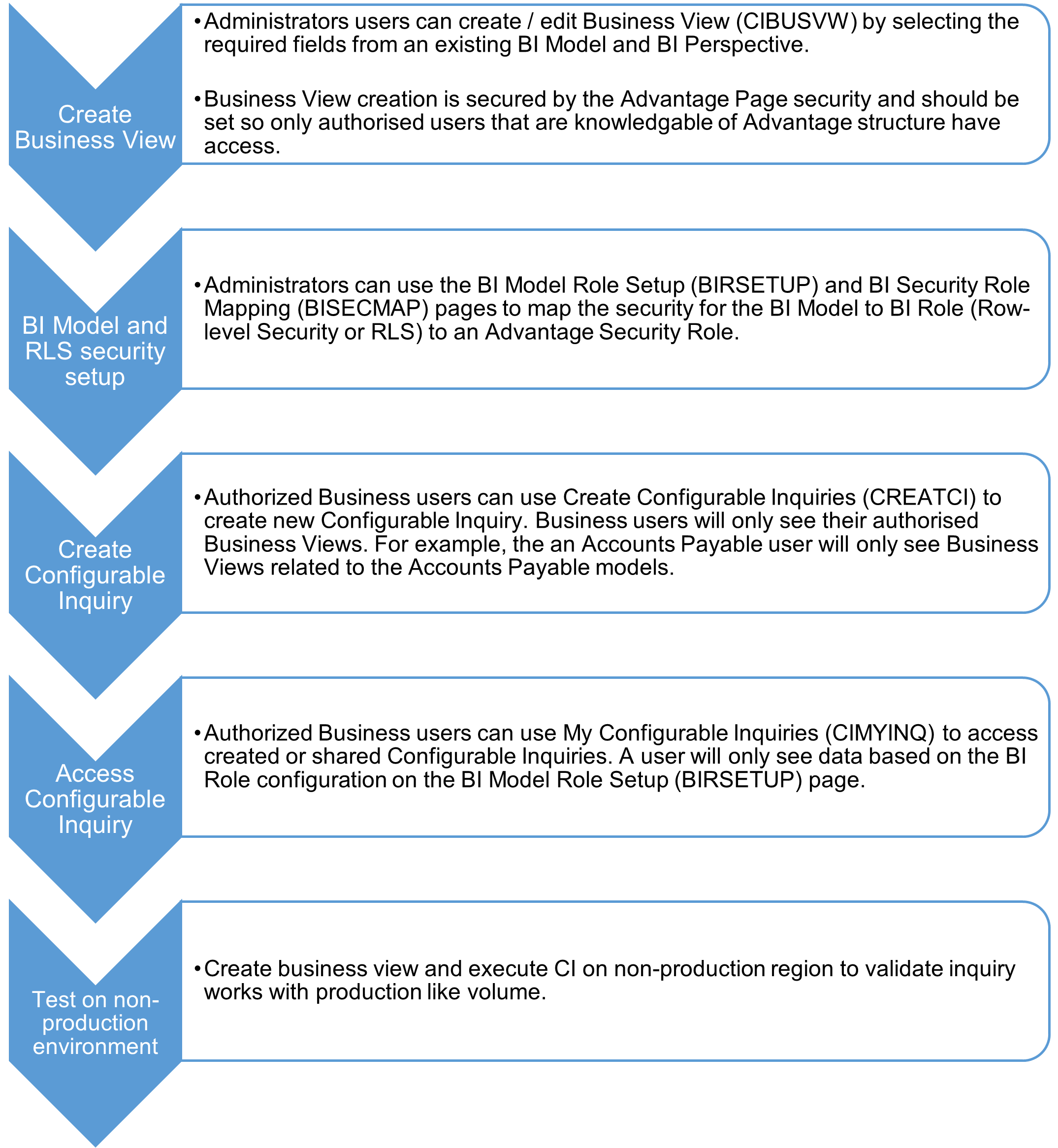
The following diagram explains how Advantage and BI security works for created Business View and Configurable Inquiry.
Refer to the following topics in this guide for required setup: