Net Pay Distribution
The Net Pay Distribution (NPD) transaction allows you to direct your net pay to multiple bank accounts. You can use Direct Deposit function to allocate your net pay across one or more bank accounts with a schedule of your choice. For instance, you can set the schedule to every pay period, every other pay period, 1st pay period of every month, and 1st and 2nd pay period of every month based on the options used at your site. You can also submit your distribution preferences for both percentage and fixed amount shares of net pay.
Use Location Address and Warrant Handling Instructions fields can only be selected when Paystub Routing is set to Check-stub to Pay Location. When Use Location Address is selected, the address of Pay Location assigned to the employee will be used instead of Employee Address (ADDR).
Note: A Human Resource Administrator can also create or update the via the Net Pay Distribution transaction. Human Resource users should refer to the “Net Pay Distribution” topic in the Deduction Processing User Guide for more information.
If your employer utilizes CGI Travel and Expense Management, you can set up a separate account for travel, where your travel advances and reimbursements are processed. Only one account can be used for advances or reimbursements and they cannot be split into multiple accounts.
Note: The travel account will not be included in the net pay distribution if your employer uses CGI Advantage HRM payroll.
Field InformationField Information
Primary AccountPrimary Account
Select yes in the Primary Account field for the account that should be your primary account for your net pay distributions. A Primary Account is the account you designate as the one which receives all the unassigned pay. Only one primary account can exist for any given date. An attachment can be added to the Primary Account using the Attachment icon, which allows you to locate and upload the file to be attached.
A Travel Bank Account is used for travel and expense payment processing, such as disbursing the travel advances, and reimbursements. You can have only one account as a Travel Bank Account. If your employer utilizes only CGI Advantage HRM for travel and expense payments, the Travel Account will also be your Primary Bank Account. Once you enter your bank account information into the Primary Account section, select the Same Primary Account check box to set the bank account information used for travel and expense payment processing. An attachment can be added to the Travel Account using the Attachment icon, which allows you to locate and upload the file to be attached.
Secondary AccountSecondary Account
A Secondary Account is optional. You can have a maximum of nine secondary accounts. Select the Add Additional Account button and enter the account details for each Secondary account. An attachment can be added to the Secondary Account using the Attachment icon, which allows you to locate and upload the file to be attached. The following are the key options you can define for each secondary account:
-
Priority Order - Secondary accounts are assigned a Priority Order. The Priority Order determines the hierarchy by which the system allocates pay if the Paycheck does not contain enough Net Pay to distribute to all of the designated accounts. The account with a Priority Order of 1 will have the highest priority. No two accounts can share the same priority order with overlapping date ranges. Note: When entering a Secondary Direct Deposit account, either the Primary Account must be approved before a Secondary Account can be submitted or the Priority Order of the Primary Account must be set to 0.
-
Distribution Amount or Percent - Each secondary account is also assigned either a Distribution Amount (a fixed dollar amount per Pay Period) or a Distribution Percent. The total Distribution Percent from all secondary accounts for any date range cannot exceed 100%.
-
Deduction Frequency - Depending on your employer’s requirements, some secondary accounts can also be assigned a Deduction Frequency. Accounts that allow a Deduction Frequency will only receive direct deposits in Pay Periods linked to the frequency entered. This allows for flexible deposit schedules. For example, if you are paid bi-weekly and the Deduction Frequency for a secondary account is monthly, you will be paid out once a month to this secondary account. The Primary account will be paid every pay period.
The ABA Routing Number and Account Number are located on your check as indicated below:
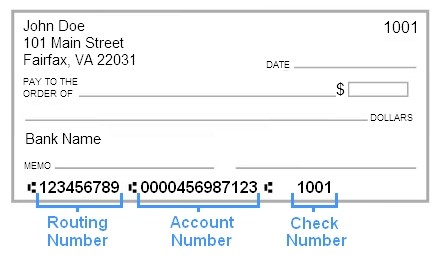
Net Pay Distributions can be allocated by either a percentage or a set dollar amount. For dollar base allocations, distributions to the secondary accounts are first fulfilled prior to distributing money to the primary account. Secondary accounts only receive the allocated distribution amount if the full amount for that account is available. For percent based allocations, the total percentage allocation for secondary accounts does not have to add up to 100%. The total can be less than 100% but not more than 100%. If the total percentage is less than 100%, the remaining amount will go to the Primary Account. No partial amounts or percentages can be distributed to secondary accounts.
Refer to the following examples for more information on how this processing works.
Dollar Based Distribution ExamplesDollar Based Distribution Examples
Primary Account (no amount/percent is specified for the primary account)
-
1st Secondary Account - $300
-
2nd Secondary Account - $250
-
3rd Secondary Account - $200
Example 1 - Enough money to distribute to all Secondary accounts
You have $1000 to distribute. In this example, the 1st Secondary account receives $300, the 2nd Secondary account receives $250, the 3rd Secondary account receives $200, and remaining amount of $250 goes to the Primary account.
Example 2 - Not enough for 1st Secondary, 2nd Secondary, or 3rd Secondary
You have $195 to distribute. There is not enough money to fulfill the allocation requirement for the 1st Secondary account, so that account receives zero. There is not enough money to fulfill the allocation requirement for the 2nd Secondary account, so that account receives zero. There is not enough money to fulfil the allocation requirement for the 3rd Secondary account, so that account receives zero. The Primary account gets the full $195.
Example 3 - Not enough to make 1st Secondary, but enough for 2nd Secondary, not enough for 3rd Secondary
You have $295 to distribute. There is not enough money to fulfill the distribution allocation to the 1st Secondary account so that account receives zero. There is enough money to fulfil the requirement for the 2nd Secondary account, so that account receives $250. This leave $45, which is not enough for the 3rd Secondary account, which receives zero. Therefore, the Primary account gets the remaining $45.
Percentage Based Distribution ExamplesPercentage Based Distribution Examples
For these examples, the accounts are setup as follows:
-
Primary Account (no amount /percent specified for the primary account)
-
1st Secondary Account - 50%
-
2nd Secondary Account - 25%
-
3rd Secondary Account - 10%
Example 1 - Enough for 1st, 2nd, and 3rd Secondary account
The total percentage allocation for secondary accounts does not have to add up to 100%. Therefore, if you have $1000 to distribute, the 1st Secondary account in this example will receive 50% of the original net pay amount, which is $500. The 2nd Secondary Account receives 25% of the original net pay amount, which is $250. This leave $250. The 3rd Secondary Account receives 10% of the original net pay amount, which is $100. There is now $150 remaining, which goes to the Primary account.
For this example, the accounts are setup as follows:
-
Primary Account (no amount/percent is specified for the primary account)
-
1st Secondary Account - 50%
-
2nd Secondary Account - $200
-
3rd Secondary Account - 10%
Example 1 - Enough for all Secondary Accounts
You have $1000 to distribute. The 1st Secondary account is allocated at 50% of the original net pay amount, so this account gets $500. The 2nd Secondary account then gets $200. This leaves $300. The 3rd Secondary account is allocated at 10% of the original net pay amount, so this account receives $100, and the Primary account receives the remaining $200.
The Net Pay Distribution transaction can be created in the following ways, based on user access rights:
-
Select the Create or Edit action on the Pay Landing > Manage Direct Deposit carousel tile to add new or edit existing information. Once you have made all your changes, select the Save & Close button to save your details and return to the Manage Direct Deposit carousel tile. If you select the Cancel button, you will exit the Net Pay Distribution transaction without saving your changes.
-
Select the Create action on the Transaction Catalog.